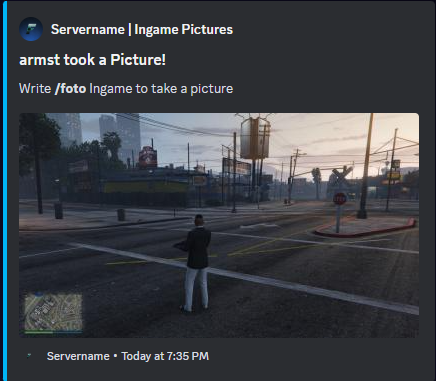

The FiveM In-Game Discord Screenshot Script offers an innovative way to effortlessly share in-game moments within FiveM on Discord. This powerful script is designed to empower players to capture high-quality screenshots, not only showcasing the visual aspects of the game but also reflecting individual graphics settings and details.
Effortless Capture System: With a simple in-game chat command, the screen freezes, and a high-quality screenshot is automatically generated.
Automatic Discord Integration: Screenshots are automatically uploaded to Discord and presented as embedded messages, facilitating seamless sharing on Discord servers.
Comprehensive Graphics Settings: Each captured screenshot includes detailed information about the player’s individual graphics settings, including resolution, graphics quality, textures, and other visual adjustments.
Easy Configuration: The script is user-friendly and straightforward to install, requiring no complicated setups or processes.
Benefits:
Player Interaction: Enhances interaction and sharing of gaming experiences on Discord, strengthening community bonds and fostering discussions within the server’s gaming community.
Ease of Use: The memorable in-game command allows for quick and straightforward screenshot capture and sharing on Discord.
Code is accessible
No
Subscription-based
No
Lines (approximately)
90
Requirements
Screenshot-basic
Support
Yes
Maybe you are Also interested in other Scripts made by me
Community Reviews
See what others are saying about this script.
This script hasn't been reviewed yet.
Be the first to share your thoughts!
Leave a Review
Share your experience and help others.
×
Embed Review Score
Copy the code below to embed the review score on your website.
