
Price
Unknown
A script by lvScripts
Price
Unknown
Description: The LV_Speedlimiter script is designed to enforce speed limits for all vehicles within the game, ensuring a controlled and safe driving experience. This script is highly configurable and supports both ESX and QBCore frameworks, making it versatile and adaptable for various server setups.
Version 1.4.0
Features:
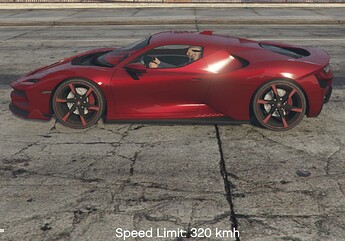
Config.EnableMaxSpeed). When enabled, all vehicles are limited to Config.MaxSpeed. When disabled, vehicles are limited based on their category (Config.CategorySpeeds).Config.CategorySpeeds). This is used when Config.EnableMaxSpeed is set to false.Config.Exceptions have their specific maximum speeds regardless of the global or category limits.kmh) and miles per hour (mph) for speed limits (Config.SpeedUnit).Config.IgnoredGroups).Config.ReductionRate with Config.ReductionTime to set how quickly the speed should be reduced if a vehicle exceeds the speed limit.Config.EnableNotification).Config.NotificationEvent), allowing server owners to integrate their preferred notification system.Config.NotificationText).Config.EnableTextDisplay, Config.TextDisplayMessage, Config.TextDisplayDuration, Config.TextDisplayColor).Config.Zones.enabled).Config.Zones.displayBlips).Config.Zones.blip).Config.Zones.zoneList).Improvements:
With these updates, the LV_Speedlimiter script provides a robust and flexible solution for managing vehicle speeds on your server, enhancing both control and realism for the players.


Config = {}

-- Framework: 'esx' or 'qbcore'
Config.Framework = 'esx'

-- Units for speed measurement: "kmh" or "mph"
Config.SpeedUnit = 'kmh'

-- Enable or disable the global maximum speed.
-- If true, Config.MaxSpeed is used, and Config.CategorySpeeds is ignored unless overridden by zones.
-- If false, Config.CategorySpeeds are used to define speed limits based on vehicle categories.
Config.EnableMaxSpeed = true

-- Maximum speed in km/h or mph to which vehicles are limited when Config.EnableMaxSpeed is true
Config.MaxSpeed = 200

-- Interval in milliseconds for speed checks
Config.CheckInterval = 100

-- Global reduction time in milliseconds (time to reduce speed to the limit)
Config.ReductionTime = 2000  -- 2 seconds

-- Groups to be ignored (e.g., admins)
Config.IgnoredGroups = {
    enabled = false,
    groups = {
        "admin",
        "superadmin"
    },
    -- Display a message when an ignored player enters a vehicle
    enterMessage = "No speed limit for you! XD"
}

-- Exceptions for specific vehicles (model name -> maximum speed in km/h or mph)
-- These exceptions always apply regardless of Config.EnableMaxSpeed or Config.CategorySpeeds
Config.Exceptions = {
    ["POLICE"] = 150,
    ["AMBULANCE"] = 140,
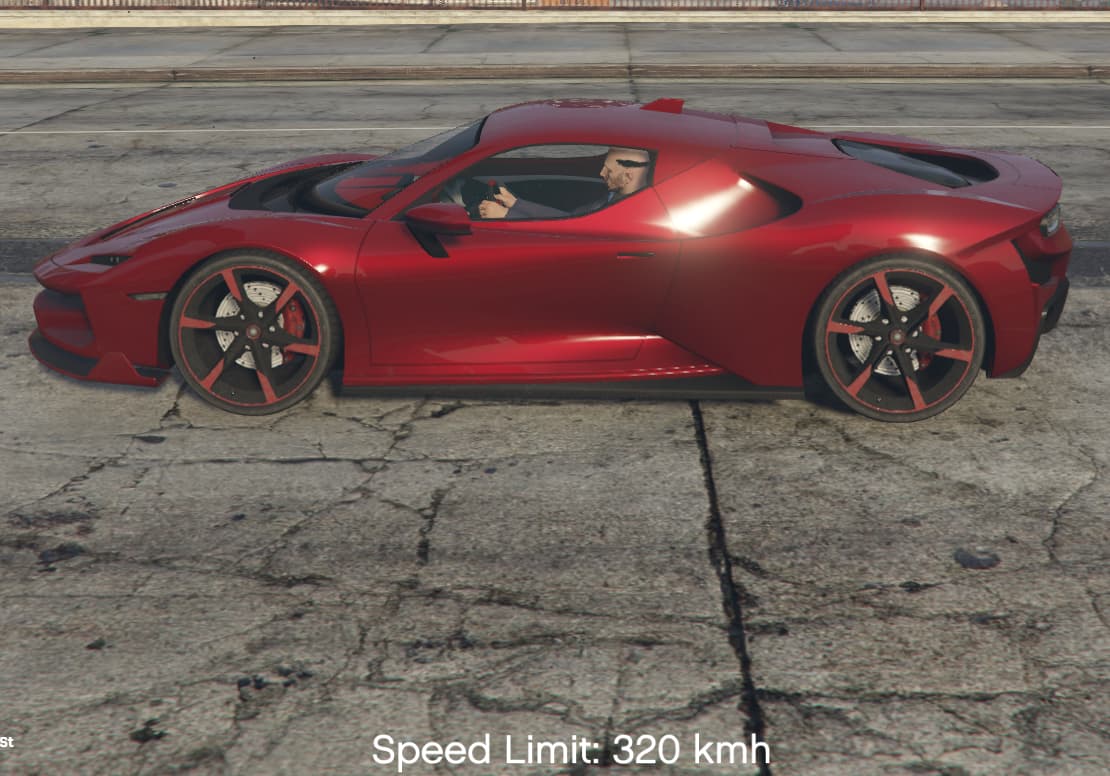
    ["ITALIRSX"] = 320
}

-- Speed limits by vehicle category (category -> maximum speed in km/h or mph)
-- Used only when Config.EnableMaxSpeed is false or when not in a zone
Config.CategorySpeeds = {
    ["compacts"] = 150,
    ["sedans"] = 160,
    ["suvs"] = 140,
    ["coupes"] = 180,
    ["muscle"] = 170,
    ["sportsclassics"] = 200,
    ["sports"] = 220,
    ["super"] = 250,
    ["motorcycles"] = 200,
    ["offroad"] = 180,
    ["industrial"] = 110,
    ["utility"] = 120,
    ["vans"] = 100,
    ["cycles"] = 50,
    ["boats"] = 80,
    ["helicopters"] = 160,
    ["planes"] = 200,
    ["service"] = 130,
    ["emergency"] = 150,
    ["military"] = 140,
    ["commercial"] = 120,
    ["trains"] = 100
}

-- Notification settings
Config.EnableNotification = true
Config.NotificationEvent = function(message)
    --TriggerEvent("SService:Client:MakeInfoNotify", 'info', 'Speed Limit', message, 5000)
    TriggerEvent('esx:showNotification', 'Speed Limit: ' .. message)
end
Config.NotificationText = 'The speed limit for this vehicle is: '

-- Text display settings for on-screen messages
Config.EnableTextDisplay = true
Config.TextDisplayMessage = 'Speed Limit: '
Config.TextDisplayDuration = 5000  -- Duration in milliseconds
Config.TextDisplayColor = { r = 255, g = 255, b = 255, a = 255 }  -- Text color (RGBA)

-- Zone configuration
Config.Zones = {
    enabled = true,  -- Enable or disable zone functionality
    displayBlips = true,  -- Display blips for zones on the map
    blip = {
        sprite = 161,      -- Blip sprite (adjust as needed)
        color = 2,         -- Blip color
        scale = 0.8,       -- Blip scaling
        shortRange = true  -- Blip visibility in short range
    },
    zoneList = {
        {
            name = "Residential Area",
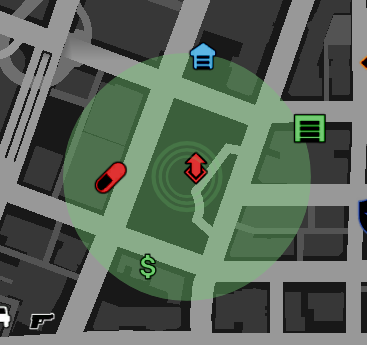
            coords = vector3(197.1024, -932.1866, 30.6867),
            radius = 150.0,
            speedLimit = 120,
            enterMessage = "You have entered {name}. Speed limit: {speedLimit} km/h..",
            leaveMessage = "You have left the residential area.",
            reductionTime = 2000,
            checkInterval = 100,
            displayColor = { r = 0, g = 255, b = 0, a = 100 }
        },
        -- Add more zones as needed
    }
}
my discord
my Discord
my other works
FiveM Discord Booster
fishing
gas station
pocketbike
|-------------------------------------|----------------------------|
| Code is accessible | No only config
| Subscription-based | No
| Lines (approximately) | >340 lines
| Requirements | ESX/QBCore
| Support | Yes
See what others are saying about this script.
Share your experience and help others.
