![[PAID | ESX - QB ] Purge - ViceX Studios - Grand Rp Style main image](https://forum-cfx-re.akamaized.net/optimized/5X/d/9/4/9/d949fb6095b196f27a2bf3db996bdd45ba28424e_2_690x388.jpeg)
![[PAID | ESX - QB ] Purge - ViceX Studios - Grand Rp Style thumbnail 2](https://forum-cfx-re.akamaized.net/optimized/5X/c/d/4/e/cd4ed37bafae2bf158c66fe02ffdb219b48dd62f_2_690x387.jpeg)
Price
Unknown
A script by ViceX_Studios
Price
UnknownViceX Studios • Purge Event System ESX & QBCore • Event & RP
 Instant Keymaster Delivery
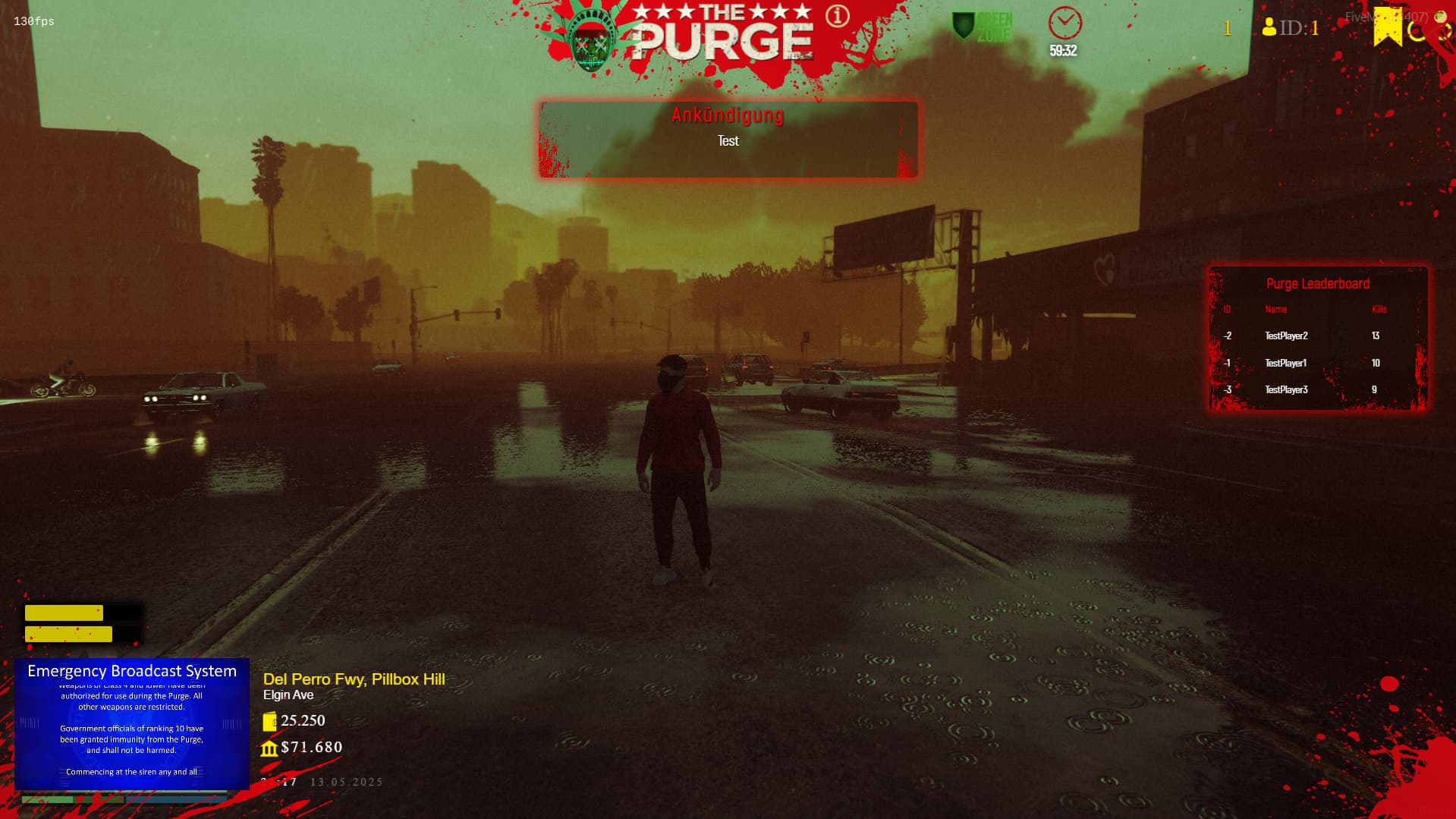
Turn your city into a chaotic Purge nightmare with vicexstudios_purge – a fully featured Purge event system by ViceX Studios. Countdown, blood-red sky, lightning, blackouts, greenzones, leaderboard and rewards: your players will never forget Purge Night again.

Built for ESX & QBCore (with ACE-based admin control), optimized for serious RP servers that want high production value events. 
Purge Night Snapshot
 Full-screen countdown & UI Red sky, fog & lightning Blackout & flickering lights Greenzones & safe areas Kill leaderboard & rewards
 Core Purge Features
Global Countdown & Event Control 
Start a server-wide Purge with a configurable countdown timer in minutes. Everyone sees exactly how long the Purge lasts and when the nightmare ends.
Cinematic Visual Effects 
Blood-red HALLOWEEN sky, dense fog, random lightning strikes and an optional city-wide blackout with flickering lights create a brutal, cinematic Purge atmosphere.
Sound & Intro Video 

On Purge start, a chilling purge.mp3 siren, optional background horror music and an optional Purge intro video can be played to hype the event.
Greenzones & Safe Areas 
Define safe zones (e.g. Hospital, Sandy Shores) where weapons, shooting or melee combat are restricted. Each greenzone can be configured individually and marked by green blips on the minimap.
Live Kill Leaderboard 
A stylish leaderboard shows the top 5 killers during Purge Night. Players can toggle the leaderboard on/off and watch the chaos unfold in real time.
Automatic Rewards for Top Players 
At the end of the Purge, the top 3 players receive rewards: money, items or vehicles – fully configurable in config.lua.
 Announcements & Admin Control
Glitch-Style Announcement System 
Schedule automatic warnings before the Purge starts or send manual global announcements in a glitchy Purge-style UI.
ACE-Protected Admin Commands 
Purge control is fully ACE-based, using:
vicexstudios.purge vicexstudios.purgestop
Only trusted staff can start/stop the Purge or send special announcements.
Test Players for Leaderboard 
Admins can spawn test players with random kill counts to test the leaderboard visuals and reward system without a full live event.
 Admin & Player Commands
Admin Commands
/Purge – Start the Purge event (ACE: vicexstudios.purge)./Purgestop – Stop the Purge and distribute rewards (ACE: vicexstudios.purgestop)./announcepurge <msg> – Send a custom Purge announcement./testplayer – Add test players with random kills (during Purge).Player Command
/purgeleaderboard – Toggle the Purge leaderboard visibility on/off. Installation
vicexstudios_purge into your resources folder.ensure vicexstudios_purge
add_ace group.admin vicexstudios.purge allowadd_ace group.admin vicexstudios.purgestop allow
Assign admins to group.admin via add_principal.
4. Database & framework
Use ESX/QBCore with MySQL (e.g. MySQL-Async or oxmysql). Vehicle rewards are stored in your owned_vehicles table (ESX standard), money/items via your framework APIs.
5. Tune config.lua
Adjust Purge duration, visual effects, greenzones, rewards, announcement timings and locale texts to match your server’s style.
6. Restart server & test a Purge
Start a test Purge, check visuals, sounds and rewards – then unleash it on your community.
 Why choose vicexstudios_purge?
 Start your own Purge Night now
With vicexstudios_purge, your server gets a signature event that players will talk about long after it ends. Add it to your cart, plug it into your ESX/QBCore setup, and let Los Santos descend into beautiful, controlled chaos.
Screenshot
| Code is accessible | Partially |
| Subscription-based | No |
| Lines (approximately) | 1400 |
| Requirements | ESX - QB |
| Support | Yes |
See what others are saying about this script.
Share your experience and help others.
