![[paid][standalone] revel hud + interact main image](https://forum-cfx-re.akamaized.net/optimized/5X/2/f/2/f/2f2ff2044694a471770476e897c5e72e76099e2f_2_690x388.jpeg)
![[paid][standalone] revel hud + interact thumbnail 2](https://forum-cfx-re.akamaized.net/original/5X/1/9/5/8/1958c002395b2742a2683ef962ce6181d5925955.png)
![[paid][standalone] revel hud + interact thumbnail 3](https://forum-cfx-re.akamaized.net/original/5X/1/9/a/3/19a3ebadf3f9db318727d770e3455a8bf3783d6f.jpeg)
![[paid][standalone] revel hud + interact thumbnail 4](https://forum-cfx-re.akamaized.net/optimized/5X/e/9/3/6/e9364eaf341ae833f2c7573481c9e4e71225c588_2_250x375.jpeg)
![[paid][standalone] revel hud + interact thumbnail 5](https://forum-cfx-re.akamaized.net/optimized/5X/f/9/2/e/f92eb65ed2b3f65509588561b75d69e996374ce7_2_254x375.jpeg)
![[paid][standalone] revel hud + interact thumbnail 6](https://forum-cfx-re.akamaized.net/original/5X/4/b/f/d/4bfd48ae56da08b3e42a88dd009a144bdc63373a.png)
Price
Unknown
A script by REVELDEV
Price
Unknown
Hello FiveM Community!
I am pleased to announce the release of two new scripts developed by me. These scripts complement each other (though not necessarily required together).
First, I introduce my HUD for FiveM, my first one designed to enhance the user experience. As a companion to this, I am also presenting Interact UI, a simple yet effective text-based UI element that can be used in loops to notify players about available interactions.
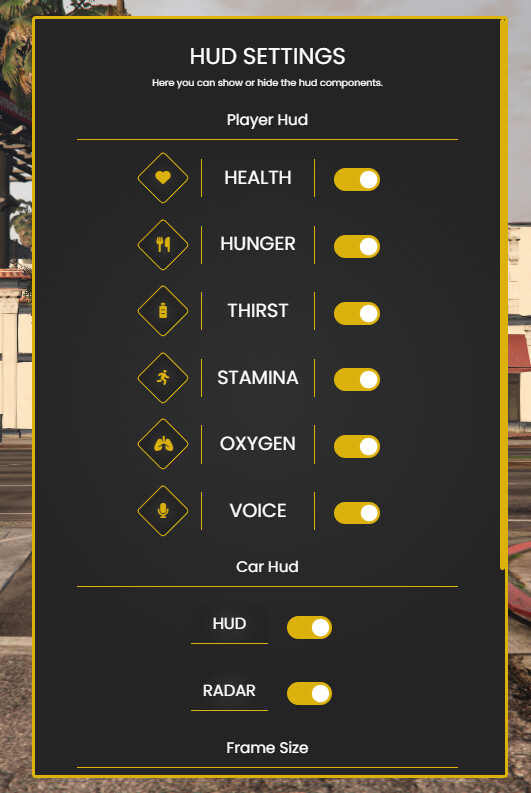
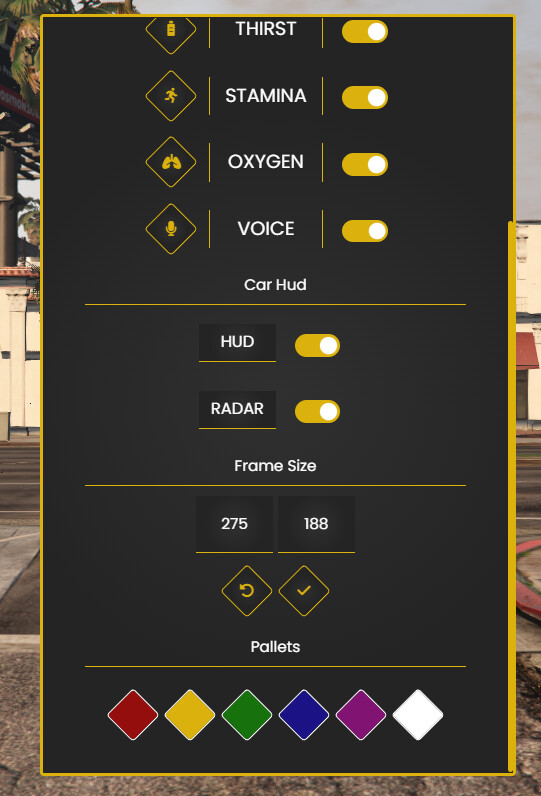
The HUD includes a settings menu, allowing users to customize, enabling and disabling features as needed.
The Interact can be placed left or right side of the screen.
They are simple and basic UIs, with easy installation.
I hope you like these scripts! I am always open to feedback and suggestions for improvement.
With much appreciation,
REVEL
This script is fully compatible with any FiveM server and is a great addition to enhance player activity and server dynamics.

Config = {}
Config.UiSide = "left" -- What side you want to display the Ui? "left" or "right".
Config = {}

Config.Framework = "Other" -- If you are using esx_status put "ESX", If you are using QBCORE system change to "QBCORE", for other one go to client/edit.lua.
Config.Command_Menu = "hud" -- Command that you want to open the Settings Menu.
Config.SeatBelt_Keybind = "B" -- By Default what keybind you want to put / take seatbelt. "https://docs.fivem.net/docs/game-references/input-mapper-parameter-ids/keyboard/".
Config.SeatBelt_Keybind_Name = "Seatbelt" -- Change the Keybind Label that will appear on ESC > Settings >  Key Bindings > FiveM.
Config.Speedometer = "KM" -- KM or MPH to define the speedometer values.
| Code is accessible | No (Edit.lua/Config.lua) |
| Subscription-based | No |
| Lines (approximately) | less 400 |
| Requirements | ESX / QBCORE / OTHER |
| Support | Always |
See what others are saying about this script.
Share your experience and help others.
