![FxRadialMenu Hexagon UI | NPC Cops System [PAID] [ESX/QB/QBox] main image](https://forum-cfx-re.akamaized.net/optimized/5X/0/5/6/f/056f9f35e4d690163ea8a0a8a5594bee376fd82e_2_690x384.jpeg)
![FxRadialMenu Hexagon UI | NPC Cops System [PAID] [ESX/QB/QBox] thumbnail 2](https://forum-cfx-re.akamaized.net/optimized/5X/6/c/2/0/6c20652647b652d9788eaaa1c059d4f274ff1b7a_2_690x388.jpeg)
![FxRadialMenu Hexagon UI | NPC Cops System [PAID] [ESX/QB/QBox] thumbnail 3](https://forum-cfx-re.akamaized.net/optimized/5X/3/c/3/d/3c3dd2bb657353a256d31858c70376603115bb34_2_690x388.jpeg)
![FxRadialMenu Hexagon UI | NPC Cops System [PAID] [ESX/QB/QBox] thumbnail 4](https://forum-cfx-re.akamaized.net/optimized/5X/a/d/f/8/adf8b9c201e85b24d2db1afd22e04e8bff5cc6b5_2_690x388.jpeg)
Price
Unknown
A script by Pathu
Price
Unknown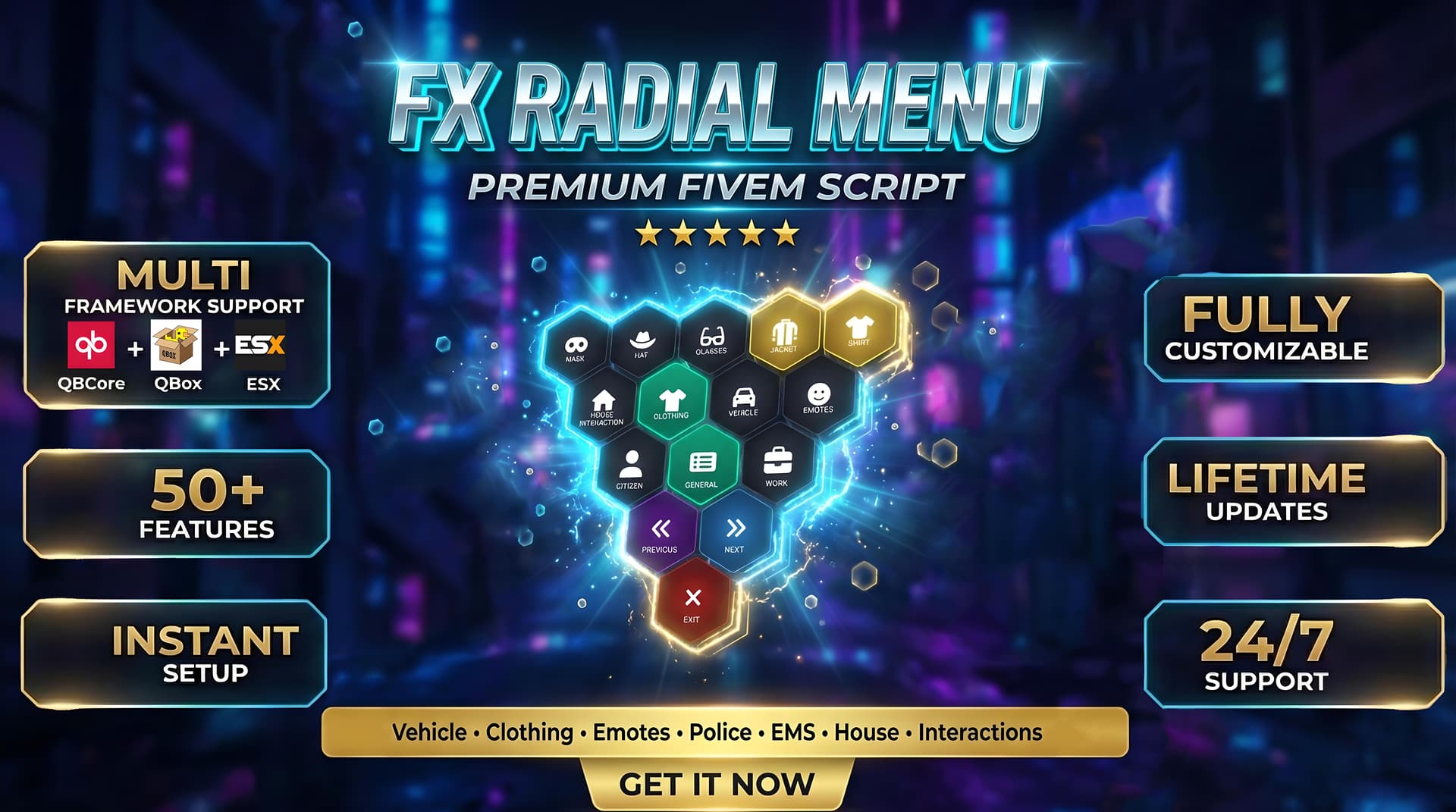
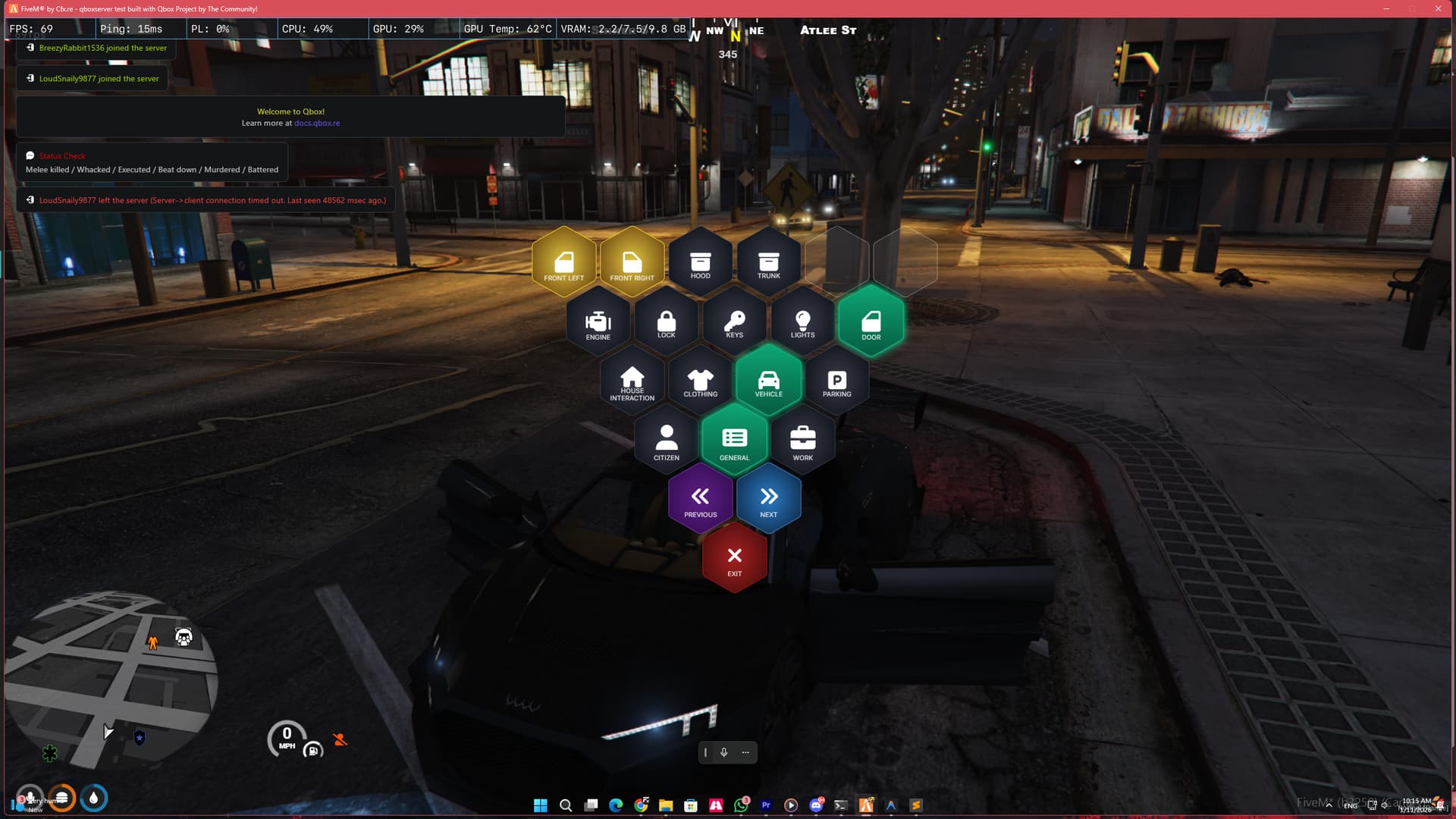
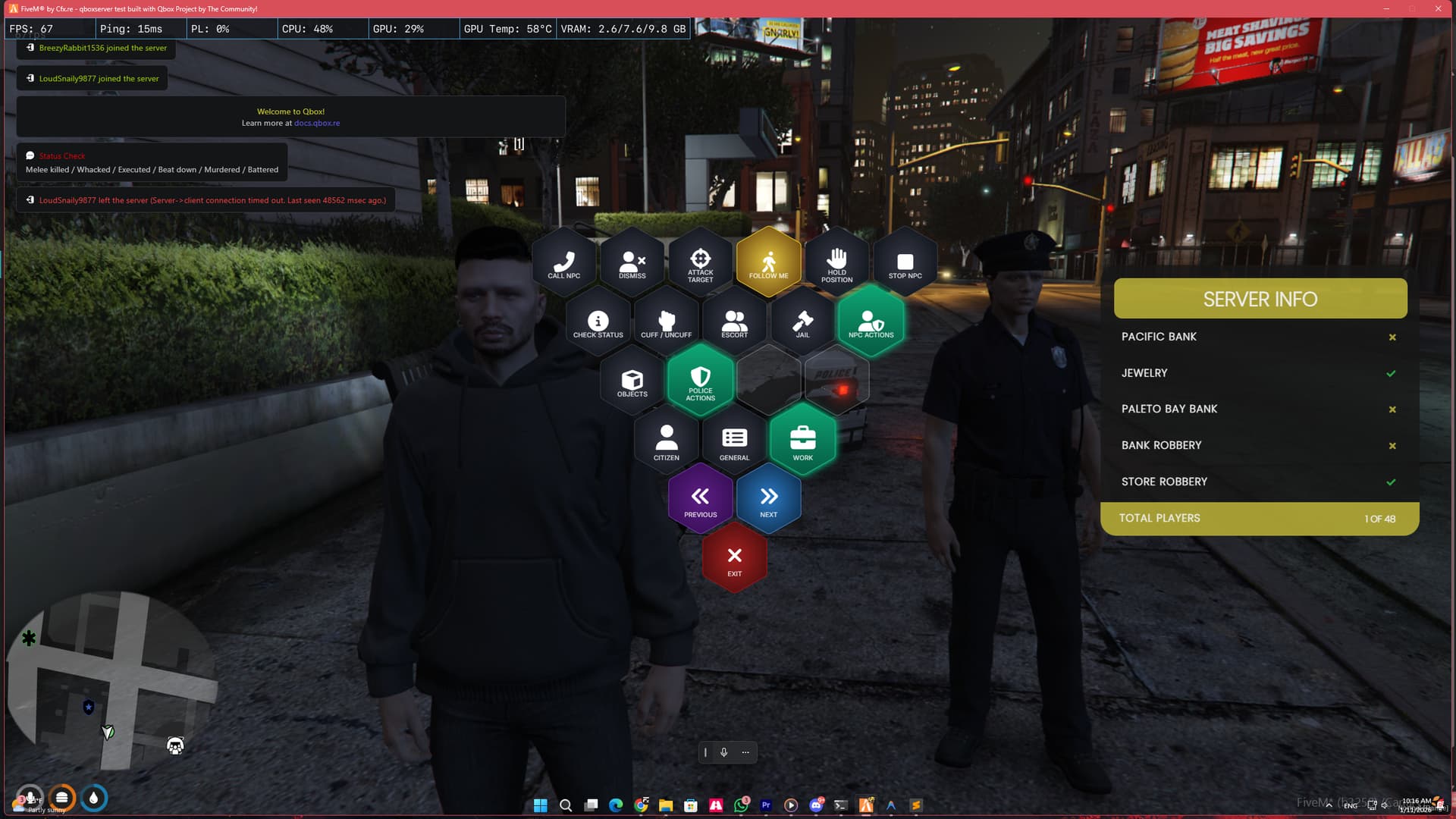
FxRadialMenu brings a sleek Hexagon UI design packed with advanced systems like AI Police Backup, Vehicle Parking, and EMS Tools into one optimized resource.
 Screenshots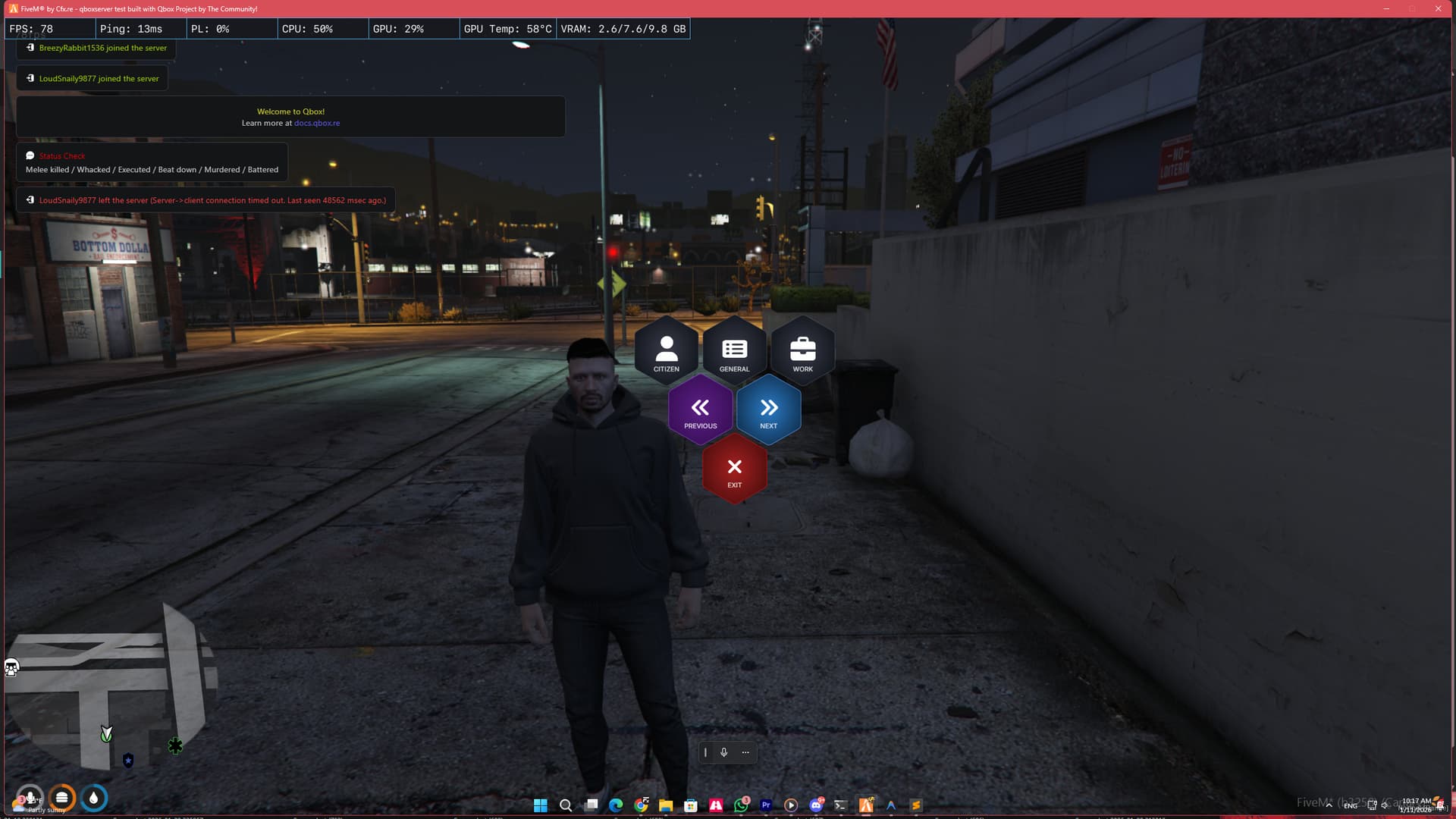
Youtube Link :- https://www.youtube.com/watch?v=GlT7hLDT1AQ
We don’t just “play animations”. We sync them.
Lag-Free Interactions: Whether you are cuffing a suspect, pushing a stretcher, or carrying a friend, our robust Server-Side State Machine ensures every player sees the exact same thing at the exact same time.
No More “Stuck” Players: Our system prevents the common “glued together” bugs found in other interaction scripts.
Struggling with low police count? Players can’t start robberies?
Delete your standalone garage script. We handle it all.
Emotes:** Dances, props, and shared interactions.
 CUSTOMIZATION & SUPPORT
Switching frameworks? No problem. The script automatically detects your core.
 QBCore QBox Project ESX Legacy
 Easy Configuration
 Optimized Performance
This script is highly optimized and lightweight. It ensures zero impact on your server performance.

Example Configuration
    ╔═══════════════════════════════════════════════════════════════════════════╗
    ║                        FxRadialMenu Configuration                         ║
    ║                                                                           ║
    ║  This file contains ALL menu buttons and settings.                        ║
    ║  Modify this file to add, remove, or customize menu items.                ║
    ╚═══════════════════════════════════════════════════════════════════════════╝

    ============================================
    BUTTON PROPERTIES REFERENCE
    ============================================
    Each button can have the following properties:

    icon      = 'fas fa-icon'        -- FontAwesome icon class (required)
    event     = 'eventName'          -- Client event to trigger
    export    = 'resource:function'  -- Export to call (alternative to event)
    exportData = { key = 'value' }   -- Data to pass to export function
    data      = { key = 'value' }    -- Data to pass to event
    children  = { ... }              -- Submenu items (if this is a category)

    ============================================
    EXPORT SYNTAX EXAMPLES
    ============================================
    -- Basic export call (no data):
    ['Open Phone'] = {
        icon = 'fas fa-phone',
        export = 'qb-phone:OpenPhone'
    }

    -- Export with data:
    ['Custom Action'] = {
        icon = 'fas fa-star',
        export = 'myresource:myFunction',
        exportData = { type = 'something', value = 123 }
    }

    -- Event call (existing method):
    ['My Button'] = {
        icon = 'fas fa-cog',
        event = 'myEvent',
        data = { param = 'value' }
    }
]]

Config = {}

-- ============================================
-- FRAMEWORK CONFIGURATION
-- ============================================
-- 'auto'   = Automatically detect framework (recommended)
-- 'qbcore' = Force QBCore mode
-- 'qbox'   = Force QBox mode
-- 'esx'    = Force ESX Legacy mode
Config.Framework = 'auto'

-- Notification system preference
-- 'auto'    = Use framework default
-- 'qbcore'  = Use QBCore.Functions.Notify
-- 'ox_lib'  = Use lib.notify (ox_lib required)
-- 'esx'     = Use ESX notifications (esx_notify or ESX.ShowNotification)
Config.NotificationSystem = 'auto'

-- ============================================
-- PARKING SYSTEM SETTINGS
-- ============================================
-- true  = Enable Radial Menu Parking (Use this if you DON'T have a garage script)
-- false = Disable Radial Menu Parking Button (Use this if you ALREADY HAVE a garage script like cd_garage)
Config.EnableParkingSystem = true

-- ============================================
-- HOUSING SYSTEM SETTINGS
-- ============================================
-- true  = Enable Radial Menu Housing (Use this if you have qb-houses/qbx_properties)
-- false = Disable Radial Menu Housing Button
Config.EnableHousingSystem = true

-- ============================================
-- GENERAL SETTINGS
-- ============================================
Config.OpenKey = "F1"                    -- Default Key to open menu (Can be changed in Game Settings > Key Bindings > FiveM)
Config.DownedHealthValue = 150           -- Health value for "downed" detection
Config.VehicleMaxDistance = 10.0         -- Maximum distance (meters) to detect vehicles when outside

-- ============================================
-- OBJECT SPAWN SETTINGS (Advanced Placement)
-- ============================================
-- Define how many objects a player can place based on their job
Config.ObjectLimits = {
    -- [Job Name] = Max Objects allowed
    ['police'] = 10,
    ['sheriff'] = 10,
    ['statepolice'] = 10,
    ['trooper'] = 10,
    ['sasp'] = 10,
    ['ranger'] = 10,

    ['ambulance'] = 10,
    ['ems'] = 10,
    ['doctor'] = 10,
    ['fire'] = 10,

    ['mechanic'] = 5,
    ['tow'] = 5,

    -- Everyone else (Civilians)
    ['default'] = 1
}

-- ============================================
-- TRUNK SYSTEM SETTINGS
-- ============================================
-- Disabled Trunks (Vehicles where you can't get in)
Config.DisabledTrunks = {
    [`zentorno`] = true,
    [`bullet`] = true,
    [`infernus`] = true,
    [`comet`] = true,
    [`comet2`] = true,
    [`comet3`] = true,
    [`comet4`] = true,
    [`jester`] = true,
    [`ninef`] = true,
    [`dune`] = true,
    [`tractor`] = true,
    [`rcbandito`] = true,
}

-- Trunk Offsets by Vehicle Class
-- Class IDs: https://docs.fivem.net/natives/?_0x29439776AAA00A62
Config.TrunkClasses = {
    [0]  = { y = -1.6, z = 0.5 },  -- Compacts
    [1]  = { y = -2.0, z = 0.4 },  -- Sedans
    [2]  = { y = -2.1, z = 0.3 },  -- SUVs
    [3]  = { y = -1.7, z = 0.4 },  -- Coupes
    [4]  = { y = -2.0, z = 0.35 }, -- Muscle
    [5]  = { y = -1.8, z = 0.4 },  -- Sports Classics
    [6]  = { y = -1.9, z = 0.35 }, -- Sports
    [7]  = { y = -2.0, z = 0.5 },  -- Super
    [8]  = { y = -1.2, z = 0.3 },  -- Motorcycles
    [9]  = { y = -1.9, z = 0.55 }, -- Off-road (Trucks/Pickups) - Raised for Camacho, etc.
    [10] = { y = -2.5, z = 0.5 },  -- Industrial (Trucks)
    [11] = { y = -1.5, z = 0.5 },  -- Utility
    [12] = { y = -2.4, z = 0.3 },  -- Vans
    [13] = { y = -1.0, z = 0.5 },  -- Cycles
    [14] = { y = -1.5, z = 0.5 },  -- Boats
    [15] = { y = -3.5, z = 0.5 },  -- Helicopters
    [16] = { y = -1.5, z = 0.5 },  -- Planes
    [17] = { y = -1.5, z = 0.5 },  -- Service
    [18] = { y = -2.0, z = 0.5 },  -- Emergency
    [19] = { y = -2.0, z = 0.5 },  -- Military
    [20] = { y = -2.5, z = 0.5 },  -- Commercial
    [21] = { y = -1.5, z = 0.5 },  -- Trains
}

-- Model-Specific Trunk Offsets (Checked FIRST before TrunkClasses)
-- Use vehicle model name (lowercase) as key
-- If a model is here, it uses these values. Otherwise, falls back to TrunkClasses.
Config.TrunkModelOverrides = {
    ['kamacho'] = { y = -1.8, z = 0.69 }, -- Kamacho (Off-road pickup) - Adjusted height
    ['sandking'] = { y = -1.8, z = 0.87 }, -- Sand King (Off-road) - Higher than Kamacho
    ['sandking2'] = { y = -1.8, z = 0.87 }, -- Sand King XL (Off-road) - Higher than Kamacho
    ['caracara'] = { y = -1.8, z = 0.65 }, -- Caracara (Off-road pickup) - Slight raise
    ['caracara2'] = { y = -1.8, z = 0.65 }, -- Caracara 4x4 variant
    ['rebel'] = { y = -1.5, z = 0.85 }, -- Karin Rebel (Off-road pickup) - Raised
    ['rebel2'] = { y = -1.5, z = 0.85 }, -- Karin Rebel V8 variant - Raised
    ['rebel01'] = { y = -1.5, z = 0.85 }, -- Karin Rebel custom variant - Raised
    -- Add more models here as needed:
    -- ['modelname'] = { y = -1.5, z = 0.6 },
}

-- ============================================
-- ROBBERY SETTINGS
-- ============================================
Config.Robbery = {
    -- true = Player must have a weapon equipped to rob someone
    -- false = Player can rob without a weapon
    RequireWeapon = true,
}


-- ============================================
-- ROW SIZE INFO (AUTOMATIC PYRAMID STRUCTURE)
-- ============================================
-- Rows are sized automatically based on their level:
-- Row 3 = 3 buttons (Main categories: CITIZEN, GENERAL, WORK)
-- Row 4 = 4 buttons (First submenu level)
-- Row 5 = 5 buttons (Second submenu level)
-- Row 6 = 6 buttons (Third submenu level)
-- Row N = N buttons
-- If active buttons < row size, empty placeholders fill the remaining slots.

-- ============================================
-- MAIN MENU CATEGORIES
-- ============================================
-- These are the 4 main hexagon buttons at the bottom
-- DO NOT change the keys (CITIZEN, GENERAL, WORK) - only modify children
Config.MainCategories = {
    CITIZEN = {
        icon = 'fas fa-user',
        label = 'CITIZEN'
    },
    GENERAL = {
        icon = 'fas fa-list-alt',
        label = 'GENERAL'
    },
    WORK = {
        icon = 'fas fa-briefcase',
        label = 'WORK'
    }
}

-- ============================================
-- CITIZEN MENU - Player Interaction Actions
-- ============================================
Config.CitizenMenu = {
    -- Order: 1=Interaction (first), 2=Contact, 3=Trunk, 4-5=Selling (last)

    -- Interaction Submenu (FIRST)
    ['1. INTERACTION'] = {
        icon = 'fas fa-handshake',
        children = {
            ['1. CUFF / UNCUFF'] = {
                icon = 'icon-handcuffs-custom',
                event = 'fxradialmenu:client:requestCuff'
            },
            ['2. PUT IN VEHICLE'] = {
                icon = 'fas fa-car-side',
                event = 'putInVehicle'
            },
            ['3. TAKE OUT OF VEHICLE'] = {
                icon = 'fas fa-car-side',
                event = 'takeOutOfVehicle'
            },
            ['4. ROB'] = {
                icon = 'fas fa-mask',
                event = 'robPlayer'
            },
            ['5. HOSTAGE'] = {
                icon = 'fas fa-user',
                event = 'takeHostage'
            },
            ['6. ESCORT'] = {
                icon = 'fas fa-user-friends',
                event = 'escortPlayer'
            },
            ['7. CARRY'] = {
                icon = 'fas fa-people-carry',
                event = 'kidnapPlayer'
            }
        }
    },

    -- Direct Actions
    ['2. GIVE CONTACT DETAILS'] = {
        icon = 'fas fa-address-card',
        event = 'giveContactDetails'
    },

    -- Trunk Submenu
    ['3. TRUNK'] = {
        icon = 'fas fa-truck-loading',
        children = {
            ['1. GET IN'] = {
                icon = 'fas fa-sign-in-alt',
                event = 'getInTrunk'
            },
            ['2. PUT IN'] = {
                icon = 'fas fa-sign-out-alt',
                event = 'putInTrunk'
            },
            ['3. PULL OUT'] = {
                icon = 'fas fa-box-open',
                event = 'fxradialmenu:client:pullOutTrunk'
            }
        }
    },

    ['4. FLIP VEHICLE'] = {
        icon = 'fas fa-car-crash',
        event = 'fxradialmenu:client:flipVehicle'
    },

    ['5. WEED PLANTING'] = {
        icon = 'fas fa-cannabis',
        children = {
            ['1. PLANT SEED'] = {
                icon = 'fas fa-seedling',
                export = 'ps-weedplanting:useWeedSeed'
            },
            ['2. CHECK NEARBY'] = {
                icon = 'fas fa-search',
                event = 'fxradialmenu:client:checkNearestPlant'
            }
        }
    }
}

-- ============================================
-- GENERAL MENU - Personal Actions & Settings
-- ============================================
Config.GeneralMenu = {
    -- House Interaction Submenu (FIRST)
    -- House Interaction Submenu (FIRST)
    -- Controlled by Config.EnableHousingSystem
    ['1. HOUSE INTERACTION'] = (Config.EnableHousingSystem and {
        icon = 'fas fa-home',
        children = {
            ['INTERACTION LOCATIONS'] = {
                icon = 'fas fa-map-marker-alt',
                children = {
                    ['SET STASH'] = {
                        icon = 'fas fa-box-open',
                        event = 'setHouseLocation',
                        locationType = 'stash'
                    },
                    ['SET WARDROBE'] = {
                        icon = 'fas fa-tshirt',
                        event = 'setHouseLocation',
                        locationType = 'wardrobe'
                    },
                    ['SET LOGOUT'] = {
                        icon = 'fas fa-door-open',
                        event = 'setHouseLocation',
                        locationType = 'logout'
                    }
                }
            },
            ['GIVE HOUSE KEYS'] = {
                icon = 'fas fa-key',
                event = 'giveHouseKey'
            },
            ['DECORATE HOUSE'] = {
                icon = 'fas fa-couch',
                event = 'decorateHouse'
            },
            -- REMOVED: House key removal disabled per user request
            -- ['REMOVE HOUSE KEYS'] = {
            --     icon = 'fas fa-key',
            --     event = 'removeHouseKey'
            -- },
            ['TOGGLE DOORLOCK'] = {
                icon = 'fas fa-door-closed',
                event = 'toggleDoorLock'
            }
        }
    } or nil),


}

--[[
    ╔═══════════════════════════════════════════════════════════════════════════╗
    ║                         HOW TO ADD NEW BUTTONS                            ║
    ╠═══════════════════════════════════════════════════════════════════════════╣
    ║                                                                           ║
    ║  1. SIMPLE BUTTON (triggers an event):                                    ║
    ║     ['Button Name'] = {                                                   ║
    ║         icon = 'fas fa-icon-name',    -- FontAwesome icon                 ║
    ║         event = 'yourEventName'       -- Event to trigger                 ║
    ║     }                                                                     ║
    ║                                                                           ║
    ║  2. BUTTON WITH SUBMENU:                                                  ║
    ║     ['Menu Name'] = {                                                     ║
    ║         icon = 'fas fa-icon-name',                                        ║
    ║         children = {                                                      ║
    ║             ['Child Button 1'] = { ... },                                 ║
    ║             ['Child Button 2'] = { ... }                                  ║
    ║         }                                                                 ║
    ║     }                                                                     ║
    ║                                                                           ║
    ║  3. EMOTE BUTTON:                                                         ║
    ║     ['Emote Name'] = {                                                    ║
    ║         icon = 'fas fa-smile',                                            ║
    ║         event = 'playEmote',                                              ║
    ║         emote = {                                                         ║
    ║             dict = 'animation_dictionary',                                ║
    ║             anim = 'animation_name',                                      ║
    ║             flag = 1                  -- 1=loop, 2=freeze at end          ║
    ║         }                                                                 ║
    ║     }                                                                     ║
    ║                                                                           ║
    ║  4. CLOTHING TOGGLE BUTTON:                                               ║
    ║     ['Item Name'] = {                                                     ║
    ║         icon = 'fas fa-tshirt',                                           ║
    ║         event = 'FxRadialMenu:ToggleClothing',                            ║
    ║         ['data-item'] = 'itemId',     -- mask, hat, glasses, etc.         ║
    ║         data = { item = 'itemId' }                                        ║
    ║     }                                                                     ║
    ║                                                                           ║
    ║  5. OBJECT SPAWNER BUTTON (for jobs):                                     ║
    ║     ['Object Name'] = {                                                   ║
    ║         icon = 'fas fa-cube',                                             ║
    ║         event = 'spawnObject',                                            ║
    ║         model = 'prop_model_name'     -- GTA prop model name              ║
    ║     }                                                                     ║
    ║                                                                           ║
    ╚═══════════════════════════════════════════════════════════════════════════╝

    ICON REFERENCE:
    - FontAwesome: https://fontawesome.com/icons
    - Custom Icons: icon-handcuffs-custom, icon-jacket-custom, icon-pants-custom,
                   icon-vest-custom, icon-earrings-custom, icon-necklace-custom,
                   icon-watch-custom, icon-bracelet-custom, icon-engine-custom,
                   icon-door-custom, icon-door-left-custom, icon-door-right-custom,
                   icon-seat-shuffle-custom, icon-seat-left-custom, icon-seat-right-custom
]]
Get it now and save compared to buying separate scripts!
| Version | Link |
|---|---|
| Escrowed | BUY HERE (Tebex) |
| Field | Details |
|---|---|
| Code is accessible | No (Escrow) |
| Subscription-based | No |
| Lines (approximately) | 3500+ |
| Requirements | oxmysql |
| Support | Yes (Discord) |
See what others are saying about this script.
Share your experience and help others.
