![Zone Weather System v3.0 [ESX/QB/QBOX] Temperature System • Time Control • Seasons Mode • Zone Creator main image](https://forum-cfx-re.akamaized.net/optimized/5X/9/5/d/0/95d0b328a7bd29e0cc81dac74579eae65b26725a_2_690x388.jpeg)
![Zone Weather System v3.0 [ESX/QB/QBOX] Temperature System • Time Control • Seasons Mode • Zone Creator thumbnail 2](https://forum-cfx-re.akamaized.net/optimized/5X/3/0/c/3/30c33cb273a7abf25e238083dde166b8ba29a8ac_2_690x388.jpeg)
![Zone Weather System v3.0 [ESX/QB/QBOX] Temperature System • Time Control • Seasons Mode • Zone Creator thumbnail 3](https://forum-cfx-re.akamaized.net/optimized/5X/c/9/4/9/c94920ae3e302d29cb1f950aa8c8fe3eec1d538b_2_690x388.jpeg)
![Zone Weather System v3.0 [ESX/QB/QBOX] Temperature System • Time Control • Seasons Mode • Zone Creator thumbnail 4](https://forum-cfx-re.akamaized.net/optimized/5X/9/8/6/6/9866cddd84f16e720c5dbd4a5f719bb26bd49523_2_690x388.jpeg)
Price
Unknown
A script by dbn_scripts
Price
Unknown ZONE WEATHER SYSTEM v3.0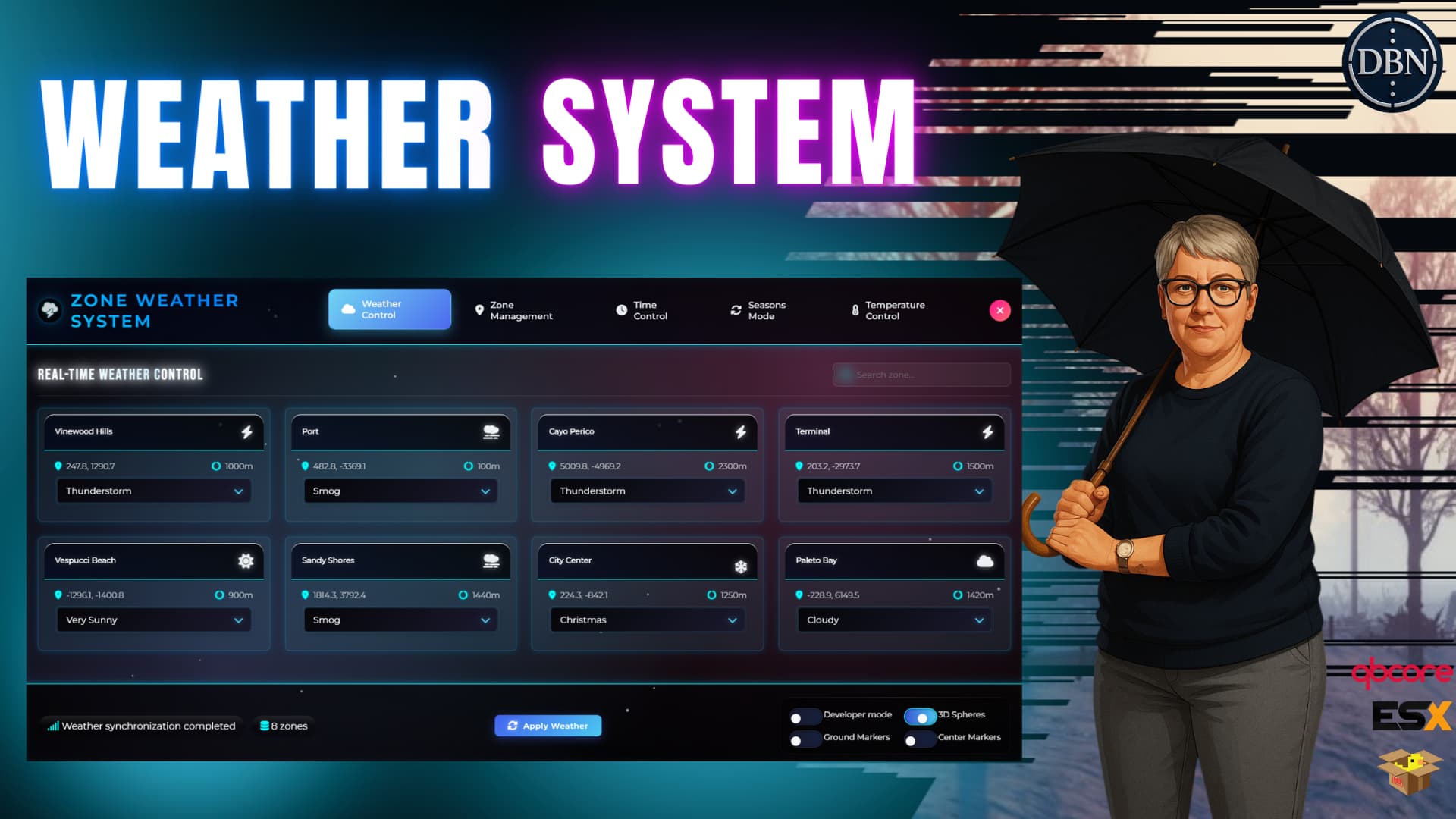
ZONE WEATHER SYSTEM v3.0 is a revolutionary, feature-rich weather system designed for FiveM servers. With dynamic zone-based climates, seamless transitions, advanced time control, realistic time system, intelligent seasons mode, and a complete temperature system, it brings immersive and realistic weather control to your RP environment.
PREVIEW v3.0 YouTube Preview
Preview v1.0: YouTube Preview
Buy It Here: Tebex Store
Discord: Join Our Community
 NEW IN V3.0 - MAJOR UPDATES
 Advanced Temperature System
Dual Mode Operation: Zone-based or weather-based temperature calculation
Day/Night Cycle Integration: Temperature automatically adjusts based on time of day
Customizable Ranges: Set minimum and maximum temperatures per zone or weather type
Real-time Calculation: Dynamic temperature updates every 5 seconds
Database Persistence: All temperature configurations saved
Temperature Display: Real-time temperature shown in admin panel
 Enhanced Seasons System
Weather Sequence Editor: Create custom weather sequences
Improved Cycle Management: Better control over weather rotation
Progress Tracking: Enhanced real-time countdown and cycle position
Smooth Transitions: Improved transition system between weather types
Zone-Specific Cycles: Different cycles can run for different zones
 Improved Time Control
Enhanced Realistic Time: Better 1:1 real-time to game-time implementation
Optimized Sync: Improved synchronization with reduced network traffic
Better Performance: Lightweight updates every second, full sync every 60 seconds
Time Presets: Quick access to morning, noon, evening, night
 Better Zone Management
Improved Transitions: Advanced blending with depth factor and edge width control
High-Speed Optimizations: Adaptive transitions based on vehicle speed
Predictive Loading: Pre-loads weather for nearby zones to prevent pop-in
Enhanced Developer Mode: Better visualization with improved 3D spheres and markers
 Framework Improvements
Better ESX Legacy Support: Enhanced compatibility with ESX Legacy
Improved Auto-Detection: More reliable framework detection
Enhanced Permissions: Better group, job, and identifier-based permissions
Standalone Mode: Improved standalone operation
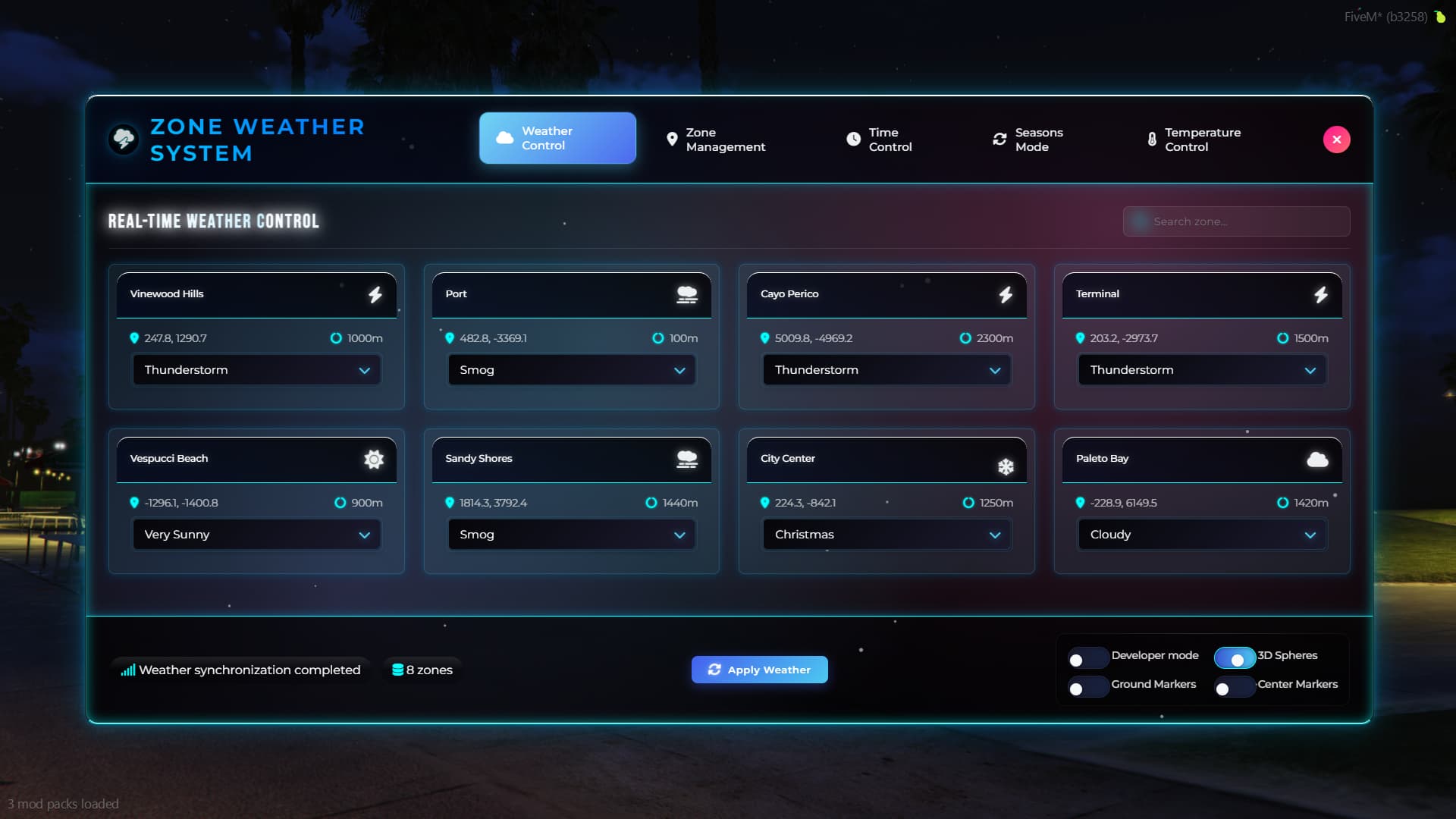
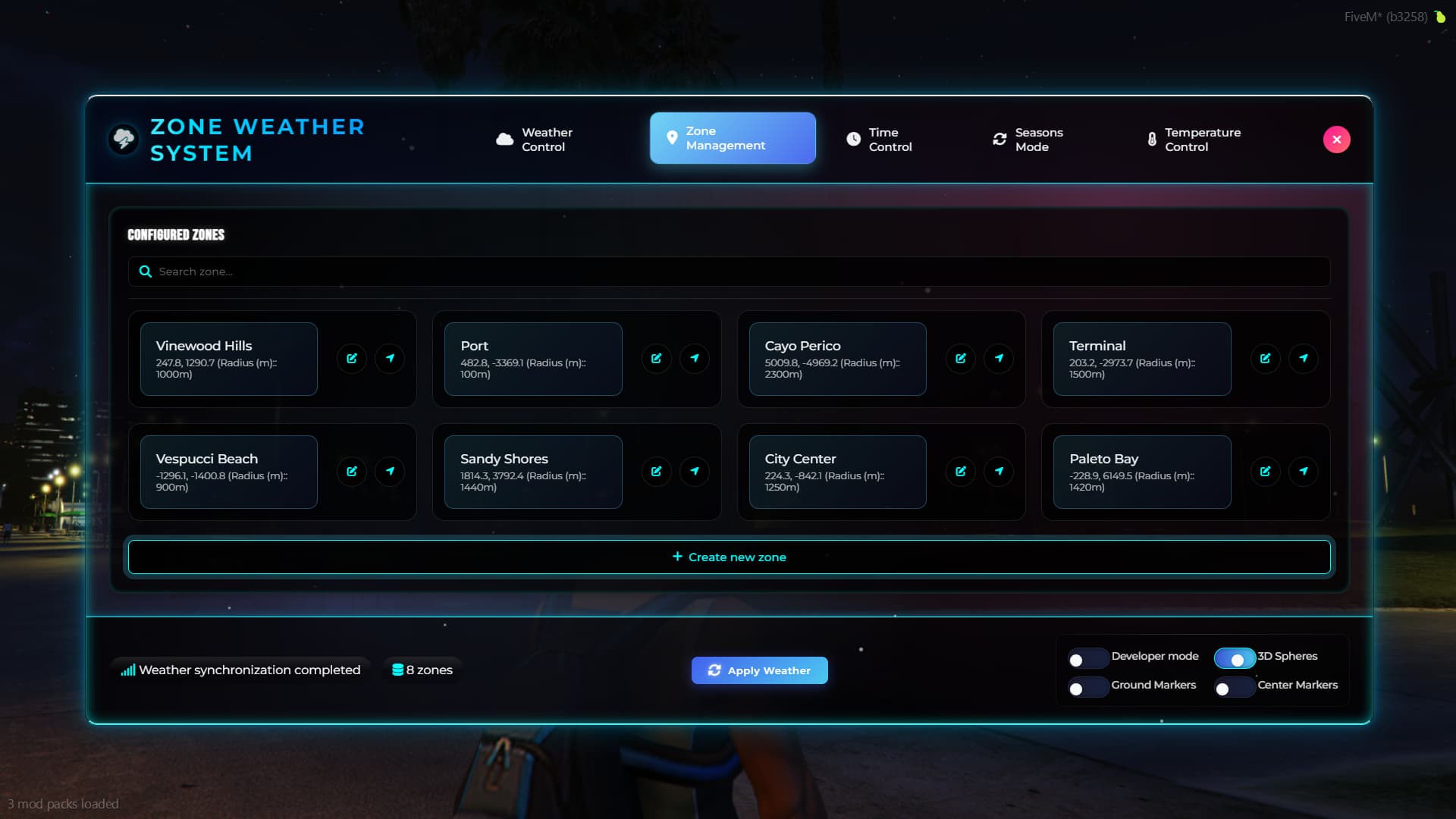
Unlimited Zones: Create unlimited weather zones across your map
Smooth Transitions: Advanced transition system with configurable duration and blending
14 Weather Types: CLEAR, EXTRASUNNY, CLOUDS, OVERCAST, RAIN, THUNDER, CLEARING, SNOW, BLIZZARD, SNOWLIGHT, XMAS, FOGGY, SMOG, NEUTRAL
Intelligent Blending: Seamless weather transitions at zone borders with depth factor
Real-time Synchronization: Server-side sync keeps all players synchronized
Weather Persistence: All weather states saved between server restarts
Dynamic Precipitation: Rain, snow, and blizzard with adjustable intensity
Atmospheric Conditions: Fog, smog, and overcast skies
Thunder & Lightning: Realistic storm effects
Performance Optimized: Efficient rendering for large servers
High-Speed Transitions: Adaptive transitions for vehicles at high speed
Predictive System: Smart prediction prevents visual pop-in
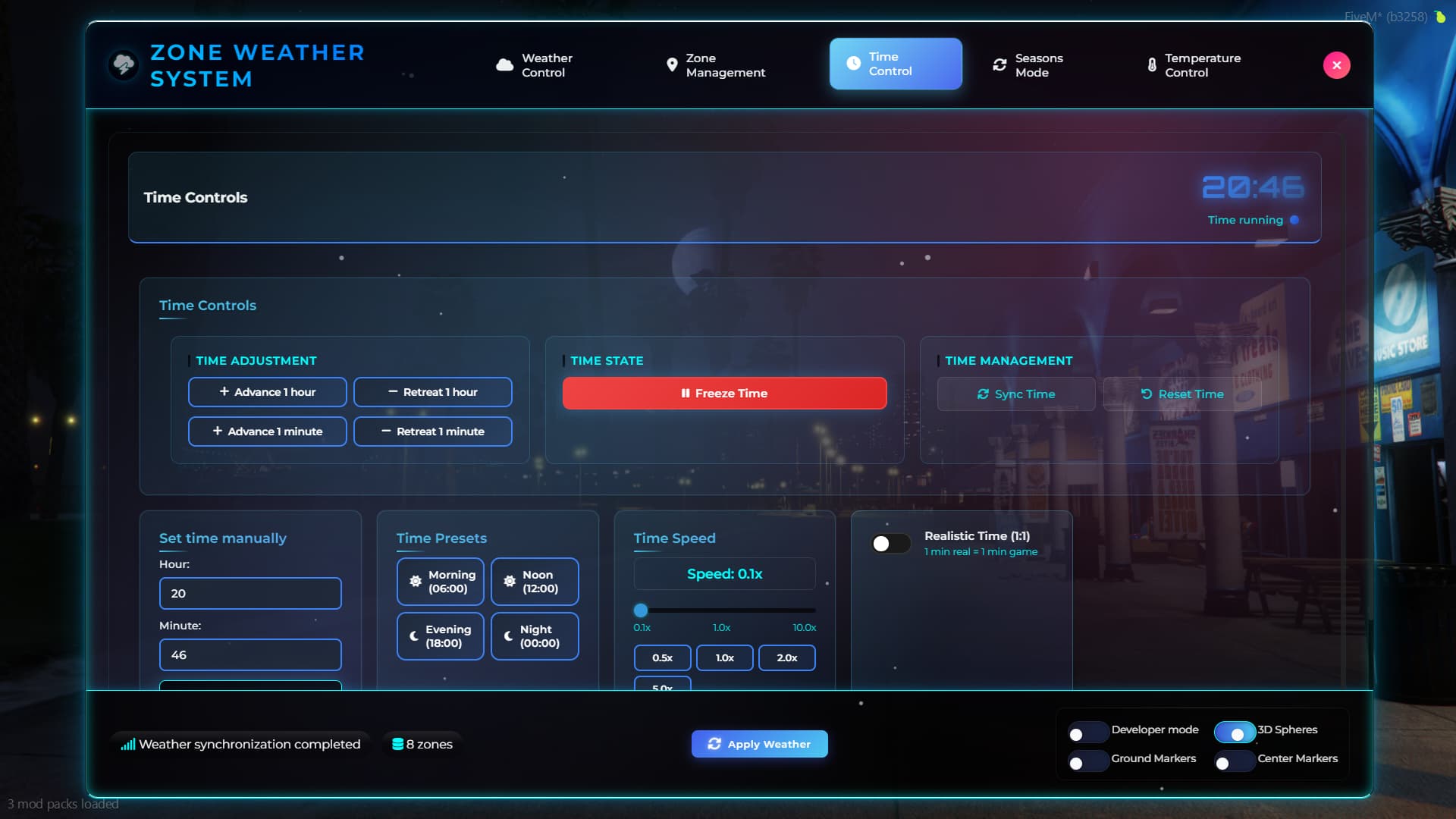
Realistic Mode: 1 minute real time = 1 minute game time
Speed Control: Adjustable time speed from 0.1x to 10x
Time Freeze: Pause time completely for events
Manual Setting: Set exact time with hour/minute precision
Time Presets: Quick access to common times (morning, noon, evening, night)
Persistent Settings: Time configuration saved in database
Server-wide Sync: All players synchronized to server time
Optimized Updates: Lightweight updates every second, full sync every 60 seconds
Admin Controls: Full time management for administrators
Event Integration: Perfect for RP events and scenarios
Export Functions: Easy integration with other scripts
Real-time Updates: Live time display in admin panel
Dual Mode: Zone-based or weather-based temperature calculation
Zone Temperature: Configure unique temperature ranges for each zone
Weather Temperature: Set temperature ranges based on weather type
Day/Night Cycle: Temperature automatically adjusts based on time of day
Customizable Ranges: Set minimum and maximum temperatures
Real-time Updates: Temperature calculated and updated every 5 seconds
Cycle Settings: Configure day start, day peak, night start, and night lowest hours
Database Persistence: All temperature configurations saved
Temperature Display: Show current temperature in admin panel
Integration Ready: Can be used with temperature mods
Weather-Based Defaults: Pre-configured temperature ranges for all weather types
Custom Sequences: Create custom weather sequences with editor
Automatic Cycling: Rotates through weather sequence automatically
Customizable Duration: 1-48 hours per complete cycle
Transition Speed: Control how fast weather changes occur (0.1x to 2.0x)
Progress Tracking: Real-time countdown to next weather change
Zone Weather Display: Shows current and next weather for each zone
Start/Stop Control: Enable or disable seasons system
Pause/Resume: Temporarily pause weather rotation
Force Change: Manually trigger next weather in sequence
Reset Function: Return to beginning of weather cycle
Auto-Start Option: Automatically start on server start
Settings Persistence: All settings saved between restarts
Create Zones: Set coordinates, radius, and default weather
Edit Existing: Modify zone properties in real-time
Delete Zones: Remove zones with confirmation
Teleport Function: Quick navigation to any zone
Search & Filter: Find zones by name or location
Zone Labels: Custom labels for better organization
3D Zone Visualization: See zones as 3D spheres in-game
Ground Markers: Visual zone boundaries on the ground
Center Markers: Highlight zone center points
Zone Information: Display zone details, distance, and depth
Blip System: Map blips for zones with configurable sprites
Render Distance Control: Configurable render distance for visuals
ESX Legacy: Full ESX compatibility with group permissions
QBCore: Complete QBCore integration with job permissions
Qbox: Native Qbox support with ACE permissions
Standalone: Works without any framework
Auto-Detection: Automatically detects and configures for your framework
Dual MySQL Support: Works with mysql-async (ESX) and oxmysql (QBCore/Qbox)
MySQL Support: Full database integration for persistence
Zone Storage: All zones saved in database
Time Configuration: Time settings persisted
Seasons Data: Seasons system configuration saved
Temperature Data: Temperature configurations saved
Automatic Migration: Seamless updates between versions
Efficient Rendering: Optimized for large player counts
Smart Updates: Only updates when necessary
Memory Management: Efficient resource usage
Network Optimization: Minimal bandwidth usage
Thread Management: Optimized thread usage
Lua 5.4: Enabled for better performance
Tabbed Navigation: Organized interface with weather, zones, time, seasons, and temperature tabs
Real-time Updates: Live information display
Visual Effects: Weather preview with particle effects
Responsive Design: Works on all screen sizes
Dark Theme: Modern dark theme for comfortable use
Mobile Friendly: Touch-optimized interface
English: Complete English translation
Spanish: Full Spanish translation
Easy Localization: Simple language file editing
Dynamic Loading: Languages loaded on demand
Custom Languages: Add your own language files
CLEAR - Clear/Sunny
EXTRASUNNY - Very Sunny
CLOUDS - Cloudy
OVERCAST - Overcast
RAIN - Rainy
THUNDER - Thunderstorm
CLEARING - Clearing
SNOW - Snowy
BLIZZARD - Blizzard
SNOWLIGHT - Light Snow
XMAS - Christmas
FOGGY - Foggy
SMOG - Smog
NEUTRAL - Neutral
Server Exports: Weather control, time management, seasons control, temperature control
Client Exports: Zone detection, weather information, current weather type
Integration Ready: Easy integration with other scripts
Event System: Comprehensive event system for custom integrations
API Documentation: Complete API documentation included in weather_exports.md
OneSync: Required for proper synchronization
MySQL Database: For data persistence
Framework: ESX, QBCore, Qbox, or standalone
Server Version: FiveM server build 2944 or higher
Download: Get the script from our store
Extract: Place in your resources folder
Database: Import the included SQL file
Configuration: Edit config.lua for your server
Start: Add to server.cfg and restart
Configure: Set up your weather zones using /weather command
Framework Detection: Automatic or manual framework selection
Permission System: Customizable admin and job permissions
Zone Settings: Default zone radius and weather
Time Settings: Default time and speed configuration
Temperature Settings: Temperature mode and cycle configuration
UI Settings: Interface theme and position options
Weather Events: Create dramatic weather for RP events
Seasonal Changes: Implement realistic seasonal weather
Zone-specific Weather: Different climates for different areas
Time Control: Manage day/night cycles for events
Temperature Effects: Add temperature for survival mechanics
Atmospheric Storytelling: Enhance immersion with weather
Admin Tools: Complete weather, time, and temperature control
Event Planning: Prepare weather for events
Player Experience: Enhance player immersion
Server Identity: Create unique server atmosphere
Integration: Connect with other server systems
Custom Scripts: Easy integration with other resources
Event System: Comprehensive event callbacks
Export Functions: Full API for external scripts
Database Access: Direct database integration
Performance: Optimized for large servers
 Requirements
OneSync enabled
MySQL database
Compatible frameworks: ESX Legacy, QBCore, Qbox, or Standalone
Server build: 2944 or higher
Admin permissions for full functionality
 Installation Guide
Import the included SQL file into your database
Configure the script using the provided config file
Set up your weather zones using the admin panel (/weather command)
Configure time, seasons, and temperature settings
Restart your server — and you’re ready to go!
Perfect ForRoleplay Servers: Enhance immersion with realistic weather and temperature
Event Servers: Create dramatic weather for special events
City Servers: Different weather zones for different areas
Survival Servers: Weather and temperature affect gameplay mechanics
Any Server: Add atmosphere and immersion to your server
Transform your server’s atmosphere with ZONE WEATHER SYSTEM v3.0 - The most advanced weather system for FiveM!
| Code is accessible | No |
| Subscription-based | No |
| Lines (approximately) | More than 8.500 |
| Requirements | Written above |
| Support | Yes |
See what others are saying about this script.
Share your experience and help others.
